

幻想之地多玩家-MCP服务器
项目介绍
幻想英超MCP服务器





<a href="https://glama.ai/mcp/servers/2zxsxuxuj9">
<img width="380" height="200" src="https://gips0.baidu.com/it/u=493712562,2519573493&fm=3081&app=3081&f=PNG?w=760&h=400" />
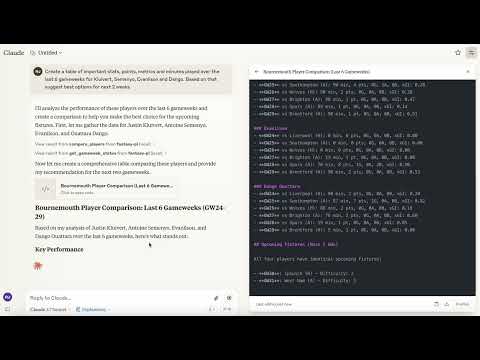
一个模型上下文协议(MCP)服务器,提供访问幻想英超(FPL)数据和工具的功能。此服务器允许您在桌面版Claude和其他兼容MCP的客户端中与FPL数据进行交互。
幻想英超MCP服务器演示
支持平台
- Claude Desktop
- Cursor
- Windsurf
- 其他兼容MCP的桌面LLMs
目前不支持移动设备。
功能
- 丰富的球员数据:通过FPL API访问全面的球员统计数据
- 球队信息:获取英超球队的详细信息
- 比赛周数据:查看当前和过去的比赛周信息
- 球员搜索:按姓名或球队查找球员
- 球员比较:比较任意两名球员的详细统计数据
要求
- Python 3.10或更高版本
- Claude Desktop(用于AI集成)
安装
方案1:从PyPI安装(推荐)
pip install fpl-mcp
方案1b:安装开发依赖项
pip install "fpl-mcp[dev]"
方案2:从GitHub安装
pip install git+https://github.com/rishijatia/fantasy-pl-mcp.git
方案3:克隆并本地安装
git clone https://github.com/rishijatia/fantasy-pl-mcp.git
cd fantasy-pl-mcp
pip install -e .
运行服务器
安装后,您可以选择几种方式运行服务器:
1. 使用CLI命令
fpl-mcp
2. 使用Python模块
python -m fpl_mcp
3. 与Claude Desktop一起使用
通过编辑您的claude_desktop_config.json文件来配置Claude Desktop以使用已安装的包:
方法1:直接使用Python模块(最可靠)
{
  "mcpServers": {
    "fantasy-pl": {
      "command": "python",
      "args": ["-m", "fpl_mcp"]
    }
  }
}
方法2:使用完整路径的安装命令(如果使用pip安装)
{
  "mcpServers": {
    "fantasy-pl": {
      "command": "/full/path/to/your/venv/bin/fpl-mcp"
    }
  }
}
用实际可执行文件的路径替换/full/path/to/your/venv/bin/fpl-mcp。您可以通过在激活虚拟环境后运行which fpl-mcp在终端中找到这个路径。
注意:仅使用
"command": "fpl-mcp"可能会导致spawn fpl-mcp ENOENT错误,因为Claude Desktop可能无法访问虚拟环境的PATH。使用完整路径或Python模块的方法可以帮助避免这个问题。
使用
在桌面版Claude中
- 启动桌面版Claude
- 您应该能看到通过锤子图标可用的FPL工具
- 示例查询:
- "比较Mohamed Salah和Erling Haaland过去5个比赛周的表现"
- "找出所有阿森纳中场球员"
- "当前比赛周的状态是什么?"
- "显示积分最高的5名前锋"
幻想-PL MCP使用指南
基本命令:
- 比较球员:"比较[球员1]和[球员2]"
- 查找球员:"查找来自[球队]的球员" 或 "搜索[球员姓名]"
- 赛程难度:"显示[球队]的即将赛程"
- 队长建议:"我应该让[球员1]还是[球员2]当队长?"
高级功能:
- 统计分析:"比较[球员1]和[球员2]的基础统计数据"
- 形势检查:"显示现在表现良好的球员"
- 差异选择:"建议低于10%所有权的差异球员"
- 队伍优化:"评估我的队伍并建议转会"
提示:
- 使用具体的球员名字以获得准确的结果
- 搜索时包括位置(FWD, MID, DEF, GK)
- 为了获得最佳队长建议,请询问关于形势、赛程和基础统计数据
- 请求特定指标的比较(xG, 射门次数等)
MCP Inspector用于开发
对于开发和测试:
# 如果您已经安装了mcp[cli]
mcp dev -m fpl_mcp

# 或者使用npx
npx @modelcontextprotocol/inspector python -m fpl_mcp
可用资源
fpl://static/players- 所有球员数据及其全面统计fpl://static/players/{name}- 按姓名搜索的球员数据fpl://static/teams- 所有英超球队fpl://static/teams/{name}- 按姓名搜索的球队数据fpl://gameweeks/current- 当前比赛周数据fpl://gameweeks/all- 所有比赛周数据fpl://fixtures- 当前赛季的所有赛程fpl://fixtures/gameweek/{gameweek_id}- 特定比赛周的赛程fpl://fixtures/team/{team_name}- 特定球队的赛程fpl://players/{player_name}/fixtures- 特定球员的即将赛程fpl://gameweeks/blank- 关于即将到来的空白比赛周的信息fpl://gameweeks/double- 关于即将到来的双倍比赛周的信息
可用工具
get_gameweek_status- 获取当前、上一和下一比赛周的精确信息analyze_player_fixtures- 分析球员的即将赛程及难度评级get_blank_gameweeks- 获取即将到来的空白比赛周的信息get_double_gameweeks- 获取即将到来的双倍比赛周的信息analyze_players- 根据多个标准筛选和分析FPL球员analyze_fixtures- 分析球员、球队或位置的即将赛程compare_players- 比较多名球员的各种指标check_fpl_authentication- 检查FPL认证是否正确工作get_my_team- 查看您的认证团队(需要认证)get_team- 查看具有特定ID的任何团队(需要认证)get_manager_info- 获取经理详情(需要认证)
提示模板
player_analysis_prompt- 创建深度分析FPL球员的提示transfer_advice_prompt- 根据预算和位置获取球员转会建议team_rating_prompt- 创建评估和分析FPL团队的提示differential_players_prompt- 创建寻找低所有权差异球员的提示chip_strategy_prompt- 创建芯片策略建议的提示
开发
添加功能
要添加新功能:
- 在
fpl_mcp/fpl/resources/中的适当文件内添加资源处理器 - 在
fpl_mcp/fpl/tools/中的适当文件内添加工具处理器 - 更新
__main__.py文件以注册新的资源和工具 - 在部署到桌面版Claude之前使用MCP Inspector进行测试
认证
要使用需要认证的功能(如访问您的团队或私人联赛),您需要设置您的FPL凭证:
# 运行凭证设置工具
fpl-mcp-config setup
这个交互式工具会:
- 提示输入您的FPL电子邮件、密码和团队ID
- 让您选择存储在config.json或.env文件中
- 安全地将凭证保存到
~/.fpl-mcp/
您可以使用以下命令测试您的认证:
fpl-mcp-config test
或者,您可以手动配置认证:
-
创建
~/.fpl-mcp/.env文件,内容如下:FPL_EMAIL=your_email@example.com FPL_PASSWORD=your_password FPL_TEAM_ID=your_team_id -
或创建
~/.fpl-mcp/config.json:{ "email": "your_email@example.com", "password": "your_password", "team_id": "your_team_id" } -
或设置环境变量:
export FPL_EMAIL=your_email@example.com
export FPL_PASSWORD=your_password
export FPL_TEAM_ID=your_team_id
限制
- FPL API没有正式文档,并且可能会未经通知更改
- 目前只支持读取操作
故障排除
常见问题
1. "spawn fpl-mcp ENOENT"错误在Claude Desktop中
这是因为Claude Desktop无法在其PATH中找到fpl-mcp可执行文件。
解决方案:使用以下方法之一:
-
在您的配置文件中使用可执行文件的完整路径
{ "mcpServers": { "fantasy-pl": { "command": "/full/path/to/your/venv/bin/fpl-mcp" } } } -
直接使用Python运行模块(首选方法)
{
  "mcpServers": {
    "fantasy-pl": {
      "command": "python",
      "args": ["-m", "fpl_mcp"]
    }
  }
}
2. 服务器立即断开连接
如果服务器启动但立即断开连接:
- 检查日志文件
~/Library/Logs/Claude/mcp*.log(macOS)或%APPDATA%\Claude\logs\mcp*.log(Windows) - 确保所有依赖项均已安装
- 尝试手动运行服务器
python -m fpl_mcp以查看任何错误
3. 服务器未出现在桌面版Claude中
如果锤子图标未出现:
- 完全重启桌面版Claude
- 验证您的
claude_desktop_config.json具有正确的JSON语法 - 确保Python或可执行文件的路径是绝对路径,而不是相对路径
许可证
本项目根据MIT许可证发布 - 详情请参阅LICENSE文件。
贡献
欢迎贡献!请随意提交拉取请求。
- 分叉仓库
- 创建功能分支(
git checkout -b feature/amazing-feature) - 提交更改(
git commit -m '添加一些精彩功能') - 推送到分支(
git push origin feature/amazing-feature) - 打开拉取请求
更多细节,请参阅CONTRIBUTING.md文件。
致谢
引用
如果您在研究或项目中使用了此包,请考虑引用它:
@software{fpl_mcp,
  author = {Jatia, Rishi and Fantasy PL MCP Contributors},
  title = {幻想英超MCP服务器},
  url = {https://github.com/rishijatia/fantasy-pl-mcp},
  version = {0.1.0},
  year = {2025},
}